


Super Goal: Fun Soccer Game
4.52.84K Reviews
App Specs
- Version
- 0.2.45
- Updated On
- License
- Free
- Downloads
- 50,000,000+
- Developer
- Gamegou Limited
- Categories
- Action
- Platform
- Android, iOS
Screenshots
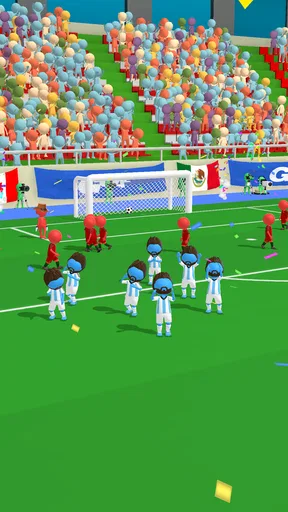
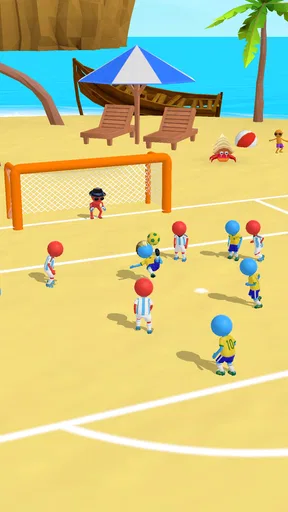
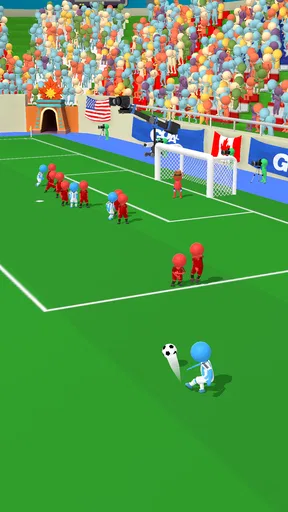
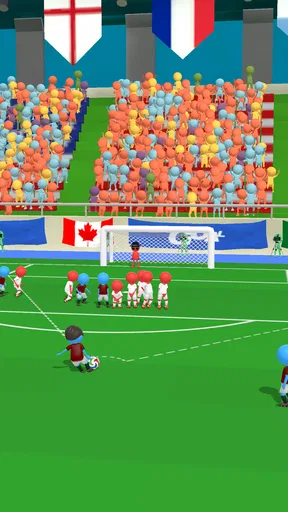

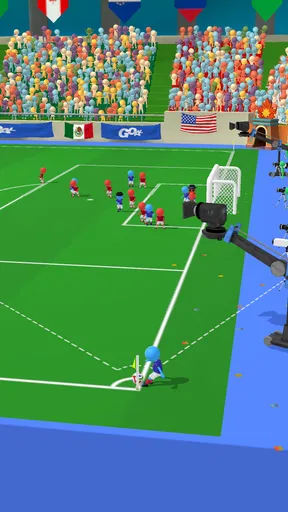
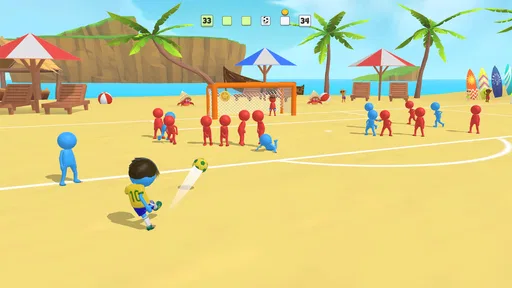
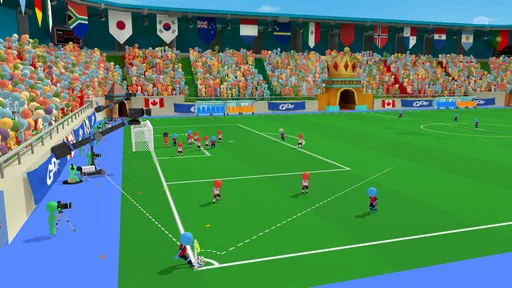
 Analysis by AppCompare
I can see Super Goal: Fun Soccer Game working best as a shared-phone game for short, casual turns rather than as a serious football simulator. Its swipe-to-shoot approach is easy to understand, so a friend or family member can pick it up without a long explanation. The levels give each turn a clear aim: work out the shot, try it, and see whether the ball finds a way past the obstacles. That makes it convenient when people are taking turns between other things, rather than settling in for a long match.
Taking turns on one device
A realistic use for it is a quiet stretch at home: one person tries a level while someone else suggests an angle, then they swap after a miss or a goal. The puzzle-like shots make that kind of informal teamwork possible without needing everyone to know football tactics. I’d treat it as a pass-the-phone activity, though, not assume that progress or scores are designed to be shared neatly between people. Before handing over a device, it’s sensible to agree whose turn it is and whether the next player should continue the current run or start fresh.
This is also where the game differs from many familiar mobile football alternatives. A full team-management or match-focused game usually asks for more time and attention; here, the appeal is a compact attempt at a particular shot. That makes it easier to fit into a break, but it also means it won’t satisfy someone looking for the rhythm of a complete football match, detailed team tactics, or a deep career experience. I’d choose it for quick aiming challenges, and a more substantial football game for those other goals.
Keeping play and purchases in perspective
The game is free to start, while optional in-app purchases are listed from $1.99 to $3.99 per item. In a household, I’d set expectations before a child plays: free access does not mean every extra is free, and purchases should be discussed with whoever manages the device. I wouldn’t assume there is a particular family control or purchase approval system inside the game. Use the device’s own settings where available, and avoid leaving a payment method available to a child without supervision.
There is a practical trade-off in its quick level format. Because each attempt is short, it’s easy to say “one more” and keep playing longer than planned, especially when a difficult shot feels nearly solved. A useful boundary is to stop at a natural point, such as after completing a level or reaching the end of a short break, rather than continuing until frustration sets in. If someone gets annoyed by retries, taking turns can help, but it won’t make a tricky level easier by itself.
Who will enjoy it, and who may not
I’d recommend it to people who like casual action games, enjoy aiming challenges, or want a football-themed game that doesn’t require learning a complex control scheme. It can also suit a mixed-age household because the basic idea is quick to explain, although younger players may still need help with device and purchase boundaries. The age rating is Everyone, and the game is published by Gamegou Limited. That rating is a useful starting point for choosing a game, but I’d still make the decision based on the child, the device rules, and whether the ads or repeated attempts are comfortable for your household.
On the other hand, I’d skip it if you want realistic match play, extensive team management, or a game that depends on careful coordination across separate accounts. The leaderboard and customization may add reasons to keep playing, but they don’t turn the central experience into a full football simulation. If competitive play with friends is your priority, check how the features work on your own device before making that the reason to install it; a leaderboard is not the same thing as a shared live match.
Worth Reading Before You Choose

Flipboard Shows What News Apps Must Do Beyond the Feed

Switching to Android Auto Means Rethinking Your Driving Routine

Google Calendar Makes a Crowded Week Easier to Manage

Ludo King Makes the Most of the Minutes Between Plans

Baby Panda World Brings Quick Play to Modern Phones, but Its Game Library Feels Busy

ESPN’s Live Game View Makes Following Close Games Easier
Small habits that make the levels less frustrating
My main practical tip is to treat each level as a shot-planning problem rather than swiping as quickly as possible. Pause long enough to notice where the defenders and barriers sit, then make a deliberate attempt. When a shot fails, change one part of your approach at a time—such as the direction or curve—instead of repeating the same gesture and hoping for a different result. This makes retries feel more like learning the layout and less like random trial and error.
For shared play, let the person holding the phone make the swipe, while the other player offers one suggestion rather than several competing instructions. The controls are simple, but small differences in aim can matter, and too much back-seat coaching can make a casual game feel tense. If the level becomes a source of disagreement, switch players or take a break. The fun is in experimenting with the shot, not proving who is better at it.
It is also worth deciding whether customization matters to you before treating unlocks as a reason to keep playing. Different players and kits can make progression feel more personal, but the core attraction remains getting the ball past the obstacles. If changing appearances is not your thing, you can focus on the level challenges instead. Likewise, if the leaderboard makes play more enjoyable, use it as a light competition; if it turns a relaxed session into pressure, there is no need to make rankings the point of the game.
On Android, the listed minimum operating system is version 6.0, and the current version is 0.2.26. The game has passed 50 million installs and holds an average rating of 4.6 from around 190,000 ratings, with roughly 2,800 written reviews. Those figures suggest a widely tried casual game, but they cannot tell you whether its ads, pacing, or level difficulty will suit you personally. I’d use the first few sessions to decide that, rather than assuming popularity guarantees a perfect fit.
If you’re wondering whether it needs a long tutorial, its swipe-based premise is straightforward enough to try without much preparation. If you’re asking whether it is suitable for a quick break, its short level structure is a natural match for that use. If you’re deciding whether it can replace a full football game, I’d say no: its strength is focused shooting challenges, not a complete match experience. And if you’re considering it for children, the Everyone rating is reassuring context, but it is still worth supervising purchases and setting sensible screen-time expectations.
For me, the best household setup is simple: install it on the device that will be used, agree on turns, and keep purchases under the device owner’s control. Don’t assume multiple people will have separate progress or that the game provides household-specific account tools. If distinct personal saves are important, a game with clearly supported individual profiles would be a better choice. That boundary avoids disappointment and keeps the experience centered on what this game does well: quick, shared attempts at finding a satisfying route to goal.
The original appeal is still its accessible shooting. You swipe to aim and kick the ball, then adjust as levels introduce defenders and moving barriers. The levels ask for a little thought without demanding football expertise, and a well-judged shot can feel rewarding. I find that balance more inviting than a control-heavy sports game when I only have a few minutes, though it naturally offers less depth for players who want a long-term competitive routine.
Getting Started with Super Goal
First off, download and installation were a breeze. The app is available on both Android and iOS, so no worries about compatibility. Once you’re in, you’re greeted with a vibrant interface that immediately sets the mood for some fun. The graphics are colorful and engaging, making the whole experience feel like you’ve stepped into a cartoon soccer world.
Gameplay and Features
Alright, let's talk gameplay. It's pretty straightforward but in the best way possible. You play by swiping the screen to aim and kick the ball into the goal. Sounds simple, right? But trust me, as you progress, the levels get trickier. Obstacles like defenders and moving barriers come into play, adding a delightful challenge.
The game is structured into levels, and each level has a different setup that requires a bit of strategy and skill. It’s all about getting the perfect shot, and there’s something incredibly satisfying about nailing a tough goal.
One of the features I really enjoyed is the ability to customize your team. You can unlock different players and kits, which keeps the game feeling fresh. Plus, there's a leaderboard where you can compete with friends and players worldwide, adding a competitive edge for those who thrive on being the best.
What Makes It Fun?
Super Goal: Fun Soccer Game doesn’t take itself too seriously, and that's part of the charm. The physics are spot-on, and the different dynamics, like bouncing off walls and spinning the ball, add layers to the gameplay that keep you coming back for more. Also, the sound effects and background music are upbeat and perfectly match the game’s lively vibe.
Another thing worth mentioning is the game’s simplicity. You don’t need to memorize complex controls or spend hours trying to figure out how to play. It’s pick-up-and-play friendly, which makes it perfect for killing time on a commute or during a break.
Room for Improvement?
As much as I’m enjoying the game, there are a few areas where it could improve. Sometimes, the ads can be a bit intrusive. I get it, free games gotta make money somehow, but I’d love an option to pay a small fee to remove them completely. Also, while the simplicity is a plus, adding a few more game modes could enhance the experience even further.
Final Thoughts
Overall, Super Goal: Fun Soccer Game is a delightful little app that packs a lot of fun into a simple concept. It’s perfect for casual gamers and soccer fans alike, offering just enough challenge to keep you entertained without overwhelming you. If you’re looking for a light-hearted, addictive game to add to your mobile collection, this one’s definitely worth a try.
So, what are you waiting for? Grab your phone, download the app, and start scoring some goals! You might just find yourself becoming the next soccer superstar in this fun, virtual world.
Pros
- Engaging gameplay keeps players hooked.
- Simple controls suitable for all ages.
- Regular updates with new features.
- Multiplayer mode enhances competitiveness.
- Vibrant graphics and smooth animations.
Cons
- In-app purchases can become costly.
- Occasional ads disrupt gameplay.
- Requires persistent internet connection.
- Limited customization options for teams.
- Some levels can be overly challenging.
FAQs for Super Goal: Fun Soccer Game
What is Super Goal: Fun Soccer Game about?
Super Goal: Fun Soccer Game is a dynamic and engaging soccer game that allows players to experience the thrill of soccer with fun twists and interactive challenges. Designed for both Android and iOS, it combines realistic gameplay with unique features, making it suitable for all ages. Players can enjoy various modes, including solo challenges and multiplayer matches.
Is Super Goal: Fun Soccer Game free to play?
Yes, Super Goal: Fun Soccer Game is free to download and play on both Android and iOS devices. However, the game includes optional in-app purchases that enhance the gaming experience by unlocking exclusive items, power-ups, and customization options. Players can still enjoy the core game without making any purchases.
What are the system requirements for Super Goal: Fun Soccer Game?
For Android users, a device running Android 5.0 or later is recommended. iOS users should have iOS 10.0 or later. The game requires a stable internet connection for certain features, especially multiplayer modes. Ensure your device has sufficient storage space for both the initial download and periodic updates.
Does Super Goal: Fun Soccer Game offer multiplayer options?
Yes, Super Goal: Fun Soccer Game offers a variety of multiplayer options. Players can compete against friends or other players worldwide in real-time matches. The game supports both local and online multiplayer modes, making it easy to challenge others and climb the global leaderboard for rewards and recognition.
Are there any parental controls in Super Goal: Fun Soccer Game?
Super Goal: Fun Soccer Game includes parental controls to help manage in-app purchases and screen time. Parents can easily enable restrictions on purchases within the game settings. Additionally, the game is designed to be family-friendly, ensuring content is appropriate for all ages without exposure to inappropriate material.


